
Fabivo · Workshop planning
Draw the furniture. Fabivo cuts it and walks you through the build.
Four steps in one tool: sketch the piece, let the optimizer lay out the sheets, follow the numbered cut order, and assemble with step-by-step instructions. Nothing to install.
- Free
- No account
- Works offline
- EN · ES · NL
From napkin to saw
Draw it crooked. It comes out square.
Not a marketing render: three consecutive screenshots of the same session, untouched.
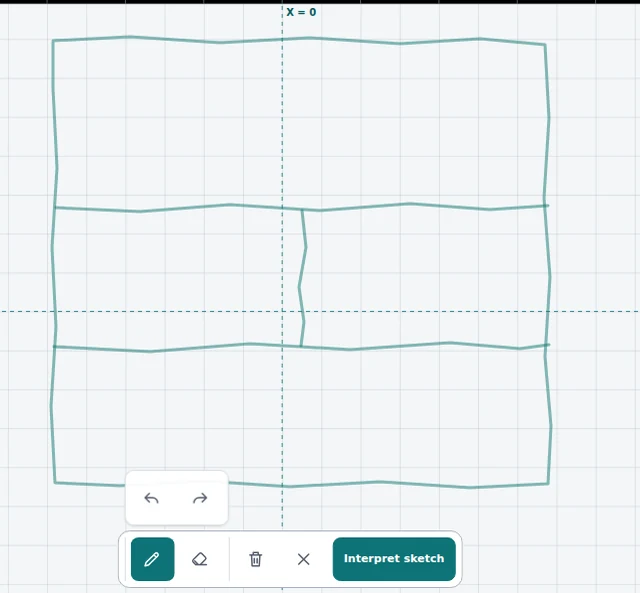
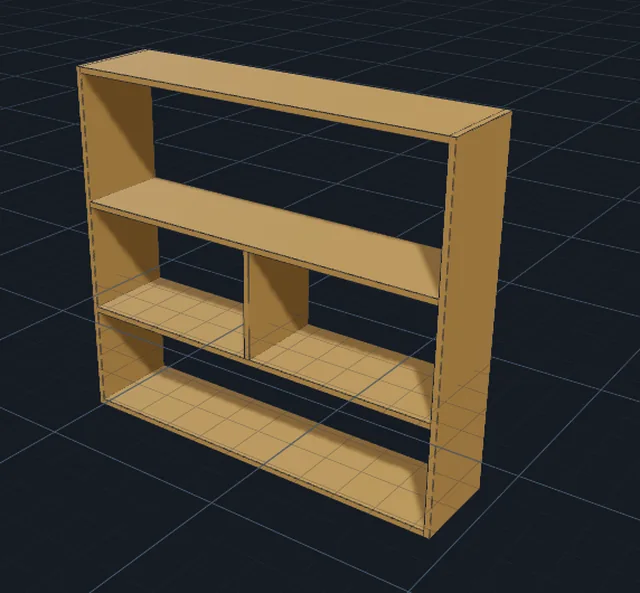
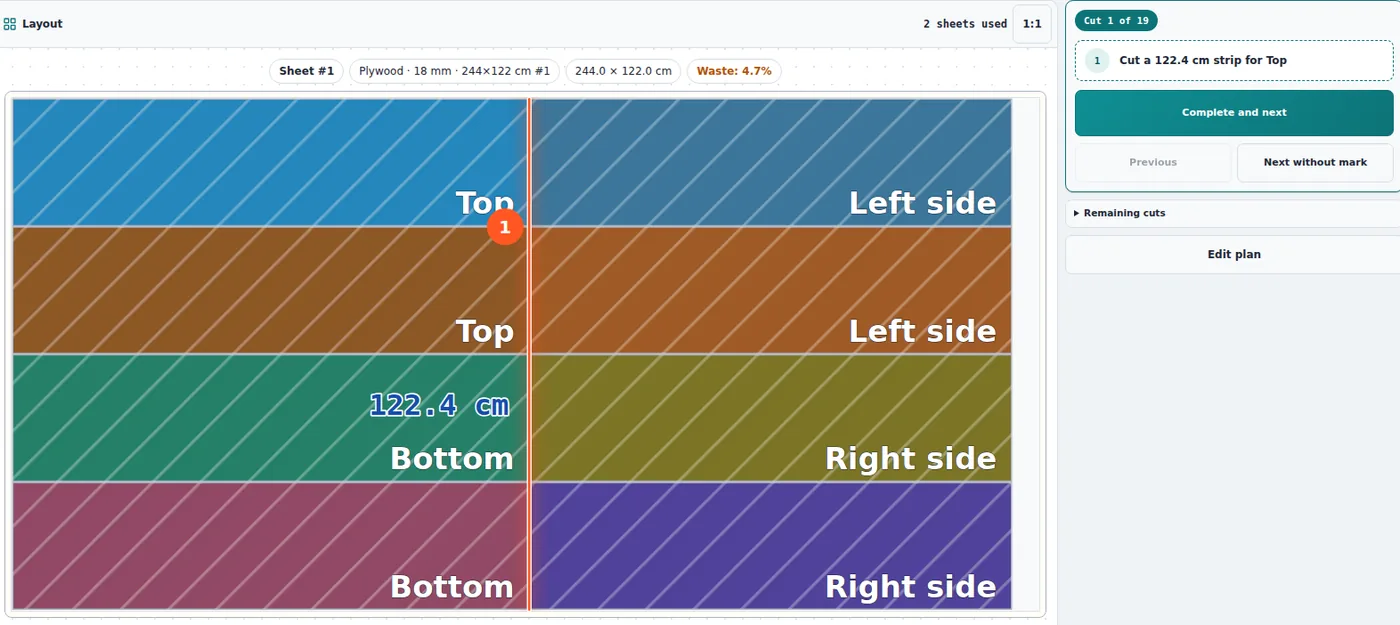
Under a minute from start to finish. No CAD, no account, nothing to install.
-
1 · Model
Draw the furniture
Sketch the elevation with a finger, pen or mouse. Fabivo straightens it and builds a parametric piece with sides, shelves, dividers, doors and drawers.
-
2 · Plan
Optimize the cut
The guillotine optimizer places parts on your real sheets, accounting for saw kerf, edge trim, grain direction and the priority you choose.
-
3 · Cut
Cut in order
Every sheet comes with its diagram and a numbered cut order, including the position of each pass, so the sequence is one a saw can actually follow.
-
4 · Assemble
Build with confidence
Assembly instructions come from the model itself: isometric diagrams, hardware, tools and one check per step.
- Materials
- Plywood, MDF, melamine, OSB
- Units
- mm, cm, inches
- Export
- PDF, PNG, SVG, CSV
- Price
- Free, no sign-up
From sketch to a real parts list
Most projects start on a napkin and die in a spreadsheet. In Fabivo the drawing is the model: it recognizes the sketch, straightens the lines and builds cabinets, shelving, tables, desks and storage modules at real dimensions.
Every panel stays connected to the model. Move a shelf, center a divider or mirror a module and the related parts update in a single undoable edit. Review the result in 2D and 3D before a single part is generated.
The AI assistant is optional: it can draft a model from a description or reference photos, but the modeler and the optimizer work without AI and without a connection.
An optimizer built for the shop, not the demo
A layout is only worth having if you can cut it. The optimizer works in guillotine passes — edge to edge, the way a panel saw or table saw actually cuts — using the settings that genuinely change the result:
- Kerf: the width your blade removes on every pass.
- Edge trim: the margin you discard on each side of the sheet.
- Grain: free, horizontal or vertical, per part and per sheet.
- Priority: max yield, balanced, or fewer cuts.
- Cut orientation: horizontal, vertical or mixed.
- Stack identical parts on the same sheet to cut them together.
What you take to the workshop
You end up with a diagram per sheet, labelled parts and dimensions, the number of sheets used, waste area, total cut count and any parts that did not fit.
Export the cut list as CSV, the diagram as SVG or PNG, and a printable PDF report for your supplier. If the project starts in a spreadsheet, import the parts from CSV instead of retyping them.
Assembly: the part most tools skip
Cutting well is not the finish line. Fabivo derives the build sequence from the model, with an isometric diagram per step, the parts being joined, hardware, tools and a check before you move on.
Choose face screws or pocket holes; the plan adapts the markings and the order to the technique you will actually use.
Free, offline, no account
Fabivo opens in a phone, tablet or laptop browser, installs as an app if you want it to, and keeps working without internet — projects are stored on your device. Available in English, Spanish and Dutch, in light and dark themes.
Frequently asked questions
Is Fabivo really free?
Yes. The modeler, the cut optimizer, the cut order, the assembly instructions and every export are free and need no sign-up.
Do I have to install anything?
No. Fabivo runs in the browser. You can install it as a PWA to open it from your desktop or home screen and use it offline.
Does it handle plywood, MDF and melamine?
Yes. Define your real sheet sizes, material, thickness and cost per unit. The layout respects grain direction on materials that have one.
Where are my projects stored?
On your device, not in an account. Export to PDF, PNG, SVG or CSV whenever you need the data somewhere else.
Is the AI assistant required?
No. It is an optional shortcut for drafting a model from text or photos. The whole cut-and-assemble flow works without it.
Ready to stop wasting sheet goods?Opens in your browser. No install, no account, no watermarks.
Start for freeUpdated